Image to Pixel Art 48x48
Fixed 48×48 square sprites for portraits, large icons, and HUD art.
Please click or drag image here
PNG, JPG, JPEG, or WebP · 5MB max
Download successful!
Your pixel art is saved.
48×48 pixel art examples
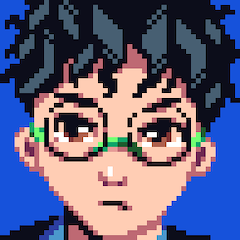


What is Image to Pixel Art 48x48?
This page outputs one thing: a 48×48 square pixel sprite (2,304 cells). 48×48 is a classic Windows large icon size and a comfortable portrait grid: eyes, hair clumps, and a simple outfit still read as pixels, not as a compressed JPEG.
Searchers asking for 48×48 usually already have a slot to fill — an icon theme, a character bust, a UI chip. They do not want a 16×16 stamp or a free-aspect pixelator. That is why this converter refuses other grid sizes.
How to turn a photo into 48×48 pixel art
- Upload the image. Conversion never leaves your device.
- Choose crop if the subject should fill the frame, or transparent fit if the full object must stay inside the square.
- Keep original colors, or remap to a game palette (NES, PICO-8, grayscale, or a library palette).
- Download PNG or ICO at 1× (48px), 2× (96px), or 4× (192px). 2× is a 96×96 file of the same 48×48 cells — useful for retina UI, not a 96×96 paint grid.
Where 48×48 shines
- Large desktop / toolbar icons — 48px is a long-standing icon bucket; ICO export matches that pipeline.
- Character portraits — a bust or headshot has room for a hairstyle and expression that 32×32 smears together.
- UI avatars — profile chips that should look crafted, not photographically downscaled.
- Mid-size game props — items that sit in a 48px HUD without a second art pass.
Why not just use 32×32 and upscale?
Upscaling 32×32 to 48px interpolates empty space; it does not invent the extra 16 cells of drawing room. Generating at 48×48 takes more samples from the photo, so a face keeps a nose and a mouth instead of a 2-pixel blob. If you actually want the chunkier 32 look, use the 32×32 converter. If you only need a favicon, use 16×16.
48×48 FAQ
Is 2× the same as a 96×96 converter?
No. 2× exports a 96×96 PNG whose every 2×2 block is one 48×48 cell. A future 96×96 tool would sample the photo onto 96 unique cells.
Will custom color controls from the homepage work here?
No. This page only offers filters, palettes, image fit, and PNG/ICO export.
Is it free?
Yes. No account, no watermark, all local.
这是什么工具?
本页只输出 48×48 正方形像素画(2304 格)。48×48 是 Windows 大图标的经典规格,也适合半身像:眼睛、发块、简单衣服都还能读成像素,而不是被压糊的照片。
搜 48×48 的人通常已经有格子要填——图标主题、角色胸像、界面头像。他们不要 16 格印章,也不要自由比例。所以这里不提供其他网格。
如何转成 48×48 像素画
- 上传图片,转换留在本地。
- 主体要铺满就「铺满」;轮廓不能切就用「适应」。
- 保留原色,或映射到 NES、PICO-8、灰度等调色板。
- 下载 PNG 或 ICO:1× 为 48px,2× 为 96px,4× 为 192px。2× 是同一张 48 格画的 96px 图,不是 96×96 新画布。
48×48 适合什么
- 大号桌面 / 工具栏图标 — 和 48px 图标槽对齐,ICO 可直接用。
- 角色胸像 — 发型、表情在 32 格里会糊成一团,48 格刚好够。
- 界面头像 — 看起来像画出来的像素头,而不是缩略图。
- 中等道具 — 放进 48px HUD 不必再重绘。
为什么不拿 32×32 放大?
把 32 格拉到 48px 只是插值,不会多出那 16 格的造型空间。在 48×48 上重新采样,鼻子和嘴巴才分得开。想要更块的 32 风格请用 32×32;只要 favicon 请用 16×16。
常见问题
2× 等于 96×96 转换器吗?
不等于。2× 导出的是 96×96 的图,每 2×2 像素对应一格 48×48。真正的 96 网格以后会单独做页面。
首页那些自定义调色控件能用吗?
不能。本页只提供基础滤镜、调色板、方形适配和 PNG/ICO。
收费吗?
免费,无水印,无需注册。